
VLBViewer PT-BR
The official VirtualLifeBrasil viewer, prepared to enter the VLB grid without manual settings.
✅ New version 7.2.17: the translation now shows on its own line, right below the original message, and the translator gained Russian, Japanese, Hindi and Indonesian. Private chat has the button Invite to VLBViewer, which writes a ready-made invitation for people who don't use the viewer yet. Friendship and system notices are in Portuguese, and the phone button no longer turns grey during a call. Includes everything from 7.2.15: the viewer has its own translator (VLB Translator): Local chat, private conversations and groups arrive translated into your language, in any grid, without relying on Google. And, if you want, he sends what you write also in English (Preferences → Chat → Translation). The system warnings won the VLB icon and the installer shows the term of the voice in Portuguese. Brings everything from 7.2.12: the window buy VL$ it became clearer and the camera presets are in Portuguese. Also no longer appears the warning "could not add ... to the grid list" when a friend of another grid has the grid turned off. Bring everything from 7.2.10: voice ball it's on top of the head of whoever's talking and it's over buy VL$ by Viewer button (PIX or PayPal). Brings everything from 7.2.9: clock shows the schedule of Brasilia (stop the mouse above to see also the grid time) and, after a teleport, the microphone back on by itself if it was on before. Bring everything from 7.2.8: the viewer is all in portuguese (menus, warnings, window edit objects, photos...) local voice no longer disappear after teleportation to another island, the messages of friendship and teleportation come out right and the help button (?) opens in portuguese. Keep everything from 7.2.7 (grid VLB Free on the list) and 7.2.6.: the audio has been fixed. Local voice and private calls working, and the viewer alone chooses the voice system of each island. Anyone using 7.2.4 or 7.2.5 can install on top. In the first entry the viewer can ask for his password again, so have it in hand. Thank you for your patience!
- Interface in Brazilian Portuguese.
- Grid VirtualLifeBrasil factory configured, and grid VLB Free on the list (just choose).
- Compatible with voice via Janus on VLB, including private calls.
- Full installer for Windows 64 bits.
This is the version 7.2.4.1 (August 2026), in a separate packaging. Use only as alternative if the main viewer presents any problems on your computer — for example if you do not open, close alone or conflict with the antivirus.
In the VLB she has local voice and private calls, and normally talks to those who use the 7.2.15. But doesn't have the news from 7.2.6 on: does not choose the voice system alone, so is not suitable for visiting other grids (Second Life, OSGrid and others), and the private call may fail after switching island (relog settles). If the main thing works for you, keep it.
Also available is a Linux x64 version of VLB Viewer. It was compiled for Ubuntu/Debian and derivatives, and was tested on Ubuntu 22.04 LTS.
Current version: 7.2.6, with the same voice corrections and private calls from Windows version.
In other distributions, such as CentOS, AlmaLinux, Rocky Linux or Slackware, it may be necessary to install additional libraries such as recent glibc/libstdc++, GTK/GLib and OpenGL video driver.
Direct installation:
wget -O /tmp/vlb-viewer.deb https://www.virtuallifebrasil.com.br/download/viewer/linux/vlb-viewer_7.2.6-1_amd64.deb
sudo apt install /tmp/vlb-viewer.deb
To update by APT:
echo "deb [trusted=yes] https://www.virtuallifebrasil.com.br/apt ./" | sudo tee /etc/apt/sources.list.d/vlb.list
sudo apt update
sudo apt install vlb-viewerUse Google Chrome preferably to download VLBViewer. Microsoft Edge and Microsoft Defender SmartScreen can still show warning because this version is new and still does not have enough reputation on Microsoft servers.
This reputation warning does not in itself mean that the installer has viruses. VLBViewer is digitally signed with a code certificate in the name of Milton Teixeira da Silva. Download only for this official page.
- Click More information.
- Check if the editor/supplier displayed is Milton Teixeira da Silva.
- If the supplier is correct, click Run anyway.
- If another vendor appears, or if the file came from another site, do not install.
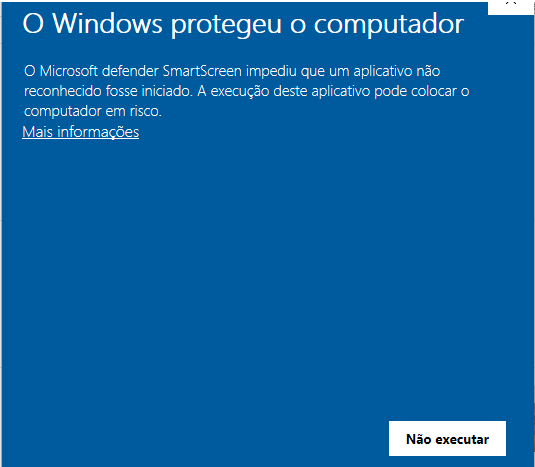 In the blue Windows warning, click More information to view the installer data.
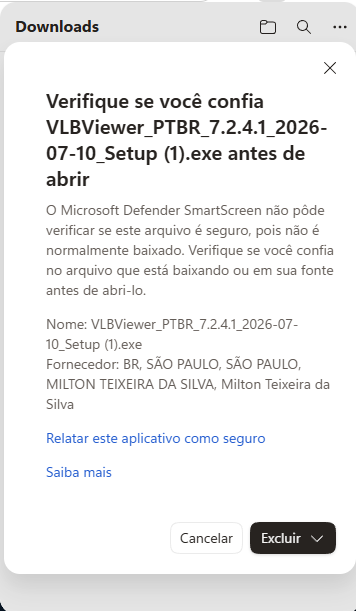 On Edge, check out the supplier. He must appear as Milton Teixeira da Silva.
Edge can show the message that the file "usually does not download". This happens with new installers, even when they are signed.
- Click See more or the download menu.
- Choose Keep.
- Before opening, check again if the supplier displayed is Milton Teixeira da Silva.
- If you prefer to avoid this warning, lower by Google Chrome.
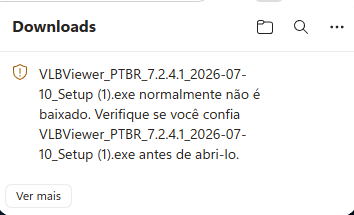 When Edge warns you that the file is not common, use See more and then Keep.
On confirmation, the correct supplier is Milton Teixeira da Silva.
When Edge warns you that the file is not common, use See more and then Keep.
On confirmation, the correct supplier is Milton Teixeira da Silva.
Right click on the installer, choose Properties and open Digital Signatures. The subscriber must appear as Milton Teixeira da Silva.
SHA256 do instalador: 6BFB85F0DB742B6CC4B8409147C6607890A5274D1B9E590177AB5B90E8801C25